Session Replay Analysis Workflow

On this page
A useful session replay review starts with one question. Define failed and successful journeys, review comparable sessions, tag visible behavior, and record what the evidence supports.
Use the six-step workflow and decision log below to choose a next check or bounded change. One memorable recording does not establish motive or cause.
Last reviewed: April 29, 2026. This guide treats session replay as one evidence layer. Replay can show observable behavior and context. It does not prove exact user intent, replace analytics or user feedback, or remove the need for privacy and consent review.
What this workflow is for
Use this workflow when the team already has session recordings but does not know which sessions deserve attention.
It is especially useful for questions like:
- Which signup sessions should we review before changing the form?
- Why do onboarding users loop between setup, docs, and settings?
- What do failed pricing sessions have in common?
- Which replay signals are strong enough to become a product fix?
- When should we ask a targeted question instead of watching more clips?
- How do we avoid turning one vivid replay into a roadmap priority?
This is not a generic “what is session replay” guide. The goal is a repeatable review system: choose the decision, choose the sessions, tag behavior, add supporting evidence, decide what to do next, and check the follow-up signal.
When replay is the wrong first tool
Session replay is not always the first tool to open.
Start somewhere else when:
- the team does not know which flow or outcome matters;
- the event tracking is missing or unreliable;
- the question is about market demand, pricing willingness, or buyer motivation rather than observed product behavior;
- the flow contains sensitive data and the team has not reviewed masking, blocking, retention, consent, and access controls;
- the team needs a statistically valid experiment rather than directional evidence;
- the team is trying to explain a broad business metric without a narrower user journey.
Replay works best after the team can name a flow, failed outcome, and decision. If the decision is still vague, start by narrowing the product question.
The 6-step session replay analysis workflow
1. Choose the decision risk
Write the decision risk in one sentence before opening recordings.
Examples:
- “Visitors start signup but do not submit.”
- “New trial users do not finish setup.”
- “Pricing visitors compare plans and leave.”
- “PLG users open a feature but do not take the activation action.”
- “Campaign visitors click the CTA and abandon the demo request page.”
Avoid broad questions like “what are users doing?” or “why are conversions down?” Broad questions create broad replay review. A decision risk makes the session set smaller and the output easier to use.
2. Define failed and successful cohorts
A replay is easier to interpret when it has a comparison group.
For a signup flow, the failed cohort might be users who opened the form but did not submit. The successful cohort might be users from the same source and device type who completed signup. For onboarding, the failed cohort might be users who started setup but never reached the first value event. The successful cohort might be users who completed setup in the same account state.
The comparison keeps the team from overreading normal behavior. A pause may be meaningful in one flow and harmless in another. A repeated page visit may signal confusion, or it may be how successful users compare details before moving forward.
3. Filter or search for relevant sessions
Do not review the whole replay library. Filter sessions around the decision risk.
Useful filters include:
- page or route;
- event completed or missing;
- traffic source;
- account state;
- device or browser;
- user segment;
- error, dead click, rage click, or form abandonment signals;
- successful versus failed outcome.
Use Monolytics Records when you need exact sessions around a known page, event, source, or user path. Use Monolytics natural-language Record Search when the question needs repeated patterns across many failed sessions.
4. Watch with a friction-tag taxonomy
Watch for behavior that can be described without guessing motive.
Use the timeline and User Journey to inspect what happened around a repeated click before naming the problem.

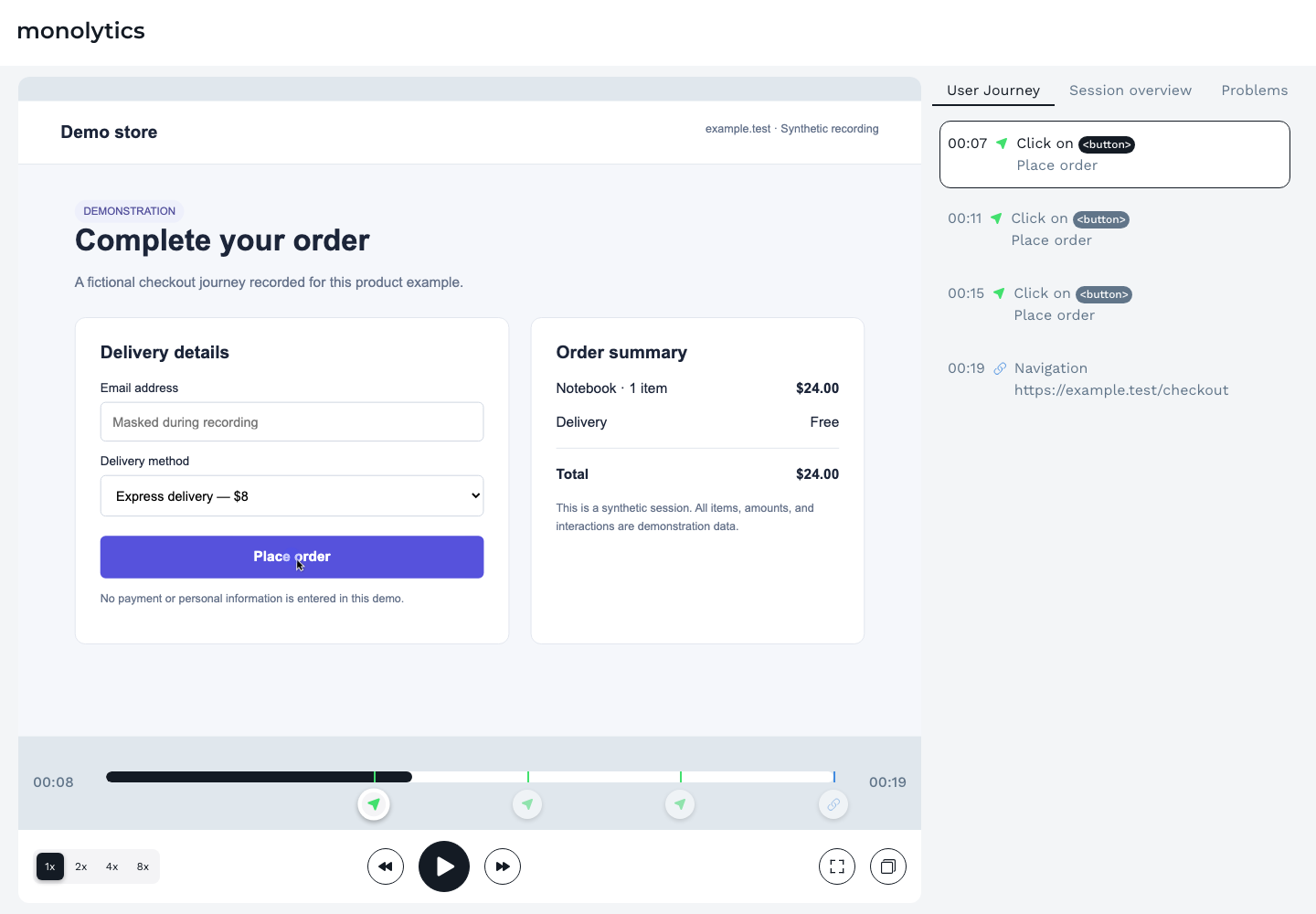
Use tags like:
- hesitation;
- looping;
- dead click;
- rage click;
- error recovery;
- form abandonment;
- trust check;
- quiet exit;
- side path.
The tag should describe what happened, not what the user felt. “Trust check” is safer than “the user was scared.” “Looping between setup and docs” is safer than “the user did not understand the product.” The interpretation can come later, after the pattern repeats and supporting evidence exists.
5. Combine replay with metrics, feedback, or support context
Replay shows behavior. It often needs another evidence layer before the team acts.
Use metrics to understand how often the pattern appears. Use support notes to see whether users ask about the same step. Use a short contextual prompt when the replay shows hesitation but not the reason. Use follow-up interviews when the team needs language, motivation, or workflow context.
For example, if several users pause near a pricing CTA and leave, do not write “users think pricing is too expensive.” A safer next step is a targeted prompt such as “What information would make the next step feel worth it?” or a comparison with successful pricing sessions.
For survey mechanics, use targeted user feedback with Monolytics Surveys. For turning evidence into a testable next change, use how to turn feedback into conversion experiments.
6. Decide the smallest fix and follow-up signal
The output of replay analysis should not be a folder of clips. It should be a decision log row:
- decision risk;
- segment reviewed;
- failed and successful cohorts;
- repeated behavior pattern;
- confidence level;
- next action;
- owner;
- follow-up signal.
The next action might be fix, instrument, survey, test, monitor, or postpone. The follow-up signal might be fewer exits from the step, more users reaching the activation event, fewer repeated support questions, or a clearer response pattern from targeted feedback.
When replay findings need to compete for the same sprint as issues surfaced by a moderated user-testing round, run the shortlist through the UX-fix prioritization framework instead of ranking by how dramatic each clip looks.
Replay Decision Workflow Kit
Use this kit when the team needs to review replay evidence in a product, growth, or UX meeting.
It has four parts:
- A triage matrix that decides which sessions to watch.
- A 30-minute review agenda that keeps the meeting focused.
- A friction-tag taxonomy that keeps observations behavioral.
- A decision log row that turns evidence into the next action.
This kit sits before the session replay evidence review template. Use the workflow kit to choose the right sessions and the evidence template to document the finding once the pattern is clear.
Replay triage matrix
| Replay type | What it means | Action |
|---|---|---|
| Watch now | The session matches the decision risk, failed outcome, and target segment | Review in the current session and tag observable friction |
| Tag for pattern review | The session has a relevant signal, but the decision context is incomplete | Save the tag and compare with similar sessions later |
| Ask a targeted question | Behavior shows hesitation, but the reason is unclear | Add a short contextual survey or follow-up question |
| Park or ignore | The session is outside the segment, lacks the failed outcome, or has too little context | Do not let it drive the current decision |
The point of triage is not to discard useful evidence forever. It is to keep the current review tied to the current decision.
30-minute replay review agenda
| Timebox | Action | Output |
|---|---|---|
| 5 minutes | Restate the decision risk, failed cohort, successful comparison, and review boundary | One sentence everyone agrees on |
| 10 minutes | Watch failed sessions that match the boundary | Behavior tags and short observations |
| 5 minutes | Watch successful comparison sessions | Differences between failed and successful behavior |
| 5 minutes | Group repeated friction patterns | One or two patterns, not a long notes list |
| 5 minutes | Choose next action and follow-up signal | Fix, instrument, survey, test, monitor, or postpone |
If the team cannot finish the review in a short agenda, the decision risk is probably too broad. Narrow the segment before watching more recordings.
Friction-tag taxonomy
| Tag | Observable behavior | Useful next question |
|---|---|---|
| Hesitation | Long pause before a meaningful action | What made the next step uncertain? |
| Looping | Repeated movement between pages or steps without progress | Which information or permission is missing? |
| Dead click | Click on an element that does not respond | Is the UI implying interactivity where none exists? Use the dead click analysis workflow when this signal repeats near a meaningful outcome. |
| Rage click | Rapid repeated clicks or taps in one area | Is there a broken control, delay, or hidden state? |
| Error recovery | User hits an error and tries to recover | Is the error message actionable? |
| Form abandonment | User starts a form and exits before completion | Which field, expectation, or trust issue created friction? |
| Trust check | User opens privacy, security, pricing, docs, proof, or legal content before continuing | What proof or expectation is missing near the decision? |
| Quiet exit | User leaves after an empty state, warning, or unclear next step | What should the product explain before the user leaves? |
| Side path | User leaves the primary path for settings, docs, help, or advanced options | Is the primary path missing context or setup guidance? |
These tags are review cues. They are not conclusions by themselves.
Decision log row
Copy this row into the issue, experiment brief, or research note after the review.
| Decision risk | Segment | Evidence reviewed | Repeated pattern | Confidence | Next action | Follow-up signal |
|---|---|---|---|---|---|---|
| Example: pricing visitors do not start trial | Comparison-page visitors on desktop | 8 failed sessions, 3 successful sessions, 1 targeted prompt | Failed sessions repeatedly check plan limits and exit after FAQ | Repeated pattern with feedback support | Clarify plan fit near the CTA and add one pricing prompt | More qualified trial starts from the same source, plus fewer plan-limit survey answers |
Keep the row plain. A decision log should help a product team act, not impress someone with research language.
How to turn replay patterns into decisions
Replay patterns usually lead to one of six decisions.
| Pattern state | Decision |
|---|---|
| One interesting clip | Treat as a hypothesis and look for similar sessions |
| Repeated behavior in a clear segment | Prioritize a small fix or targeted feedback prompt |
| Repeated behavior plus metric support | Write a stronger product, UX, or experiment brief |
| Behavior visible but reason unclear | Ask a contextual question or talk to users |
| Behavior points to missing instrumentation | Add or fix event tracking before deciding |
| Pattern is outside the target segment | Park it for a later review |
The safest wording is “this pattern suggests” or “this behavior gives us a reason to inspect.” Avoid “this proves why users left.” Replay rarely carries that level of certainty by itself.
Privacy and evidence-quality guardrails
Session replay can include sensitive behavior if implementation settings are careless. Before reviewing or sharing clips, check the controls that apply to the product and data involved.
At minimum, teams should review:
- masking and blocking rules;
- selector rules for sensitive elements;
- retention settings;
- role-based access;
- consent and opt-out handling;
- whether the flow includes financial, health, identity, personal, or authenticated account data;
- whether screenshots or clips can be safely shared outside the immediate team.
This article is not legal advice. Treat privacy controls as implementation-dependent. If a replay includes sensitive fields or user-identifying context, do not use it in public content, examples, or broad internal presentations.
Where Monolytics fits
Monolytics is useful when a team needs to ask practical questions of sessions instead of browsing recordings manually.
Use Records when you already know the page, event, source, or failed path. Use Monolytics natural-language Record Search when the team needs repeated failed-session patterns. Use Record Campaigns when the team can define the journey, success event, failed outcome, audience, and capture window in advance.
Use targeted surveys when replay shows behavior but not the reason. Use the session replay evidence review template when the pattern needs to enter prioritization.
For product context, see the Monolytics product overview and the page on how teams can see UX issues and conversion blockers. If the next step is commercial evaluation, see Monolytics pricing.
Common mistakes to avoid
Watching without a decision
Random replay watching creates a lot of notes and very few decisions. Write the decision risk first, then choose the sessions.
Watching only failed sessions
Successful sessions are often the best comparison. They show what the journey looks like when the same type of user makes progress.
Naming motives instead of behavior
“User was confused” is an interpretation. “User returned to setup three times, opened docs, and exited before connecting the integration” is an observation.
Shipping from one dramatic clip
A memorable clip can explain a problem to stakeholders, but it should not become the entire evidence base. Look for repeated patterns and supporting evidence.
Treating privacy as automatic
Masking, blocking, retention, and access controls depend on implementation. Review them before collecting, sharing, or publishing anything based on replay evidence. Use privacy-safe AI session replay analysis when AI-assisted grouping, summaries, or shared review notes become part of the workflow.
Letting AI summaries replace review
AI-assisted grouping can help organize large sets of sessions, but representative sessions still need human review before the team makes product claims or ships a fix. Use the AI session replay analysis workflow when the review needs AI-assisted triage, confidence levels, and verification guardrails. Use session replay summaries vs evidence review when the team needs a clearer boundary between summary and proof.
FAQ
What is a session replay analysis workflow?
It is a repeatable process for choosing a decision risk, filtering relevant recordings, comparing failed and successful sessions, tagging observable friction, combining replay with supporting evidence, and deciding the next action.
How do you choose which session replays to review?
Start with the flow, segment, and failed outcome. Then filter sessions that match that boundary. Review successful comparison sessions from the same journey so the team can see what changed when users did complete the outcome.
How many session replays should a team watch?
Watch enough comparable sessions to see whether the same behavior repeats, but do not treat volume alone as rigor. A small, well-defined set tied to one decision is usually more useful than a large set of unrelated clips.
How do you analyze session recordings without bias?
Write the decision risk first, tag observable behavior instead of motives, compare failed and successful sessions, and require supporting evidence before prioritizing a large change.
What should a replay analysis checklist include?
It should include the decision risk, segment, failed cohort, successful comparison group, filters, friction tags, confidence level, next evidence needed, next action, owner, and follow-up signal.
Can session replay prove why users abandoned a flow?
No. Replay can show where users paused, clicked, looped, errored, or exited. It can suggest hypotheses about friction. It should be combined with metrics, feedback, support context, or experiments before the team claims a cause.
How do surveys fit into replay analysis?
Use surveys when replay shows behavior but not the reason. The best prompt is short, contextual, and tied to the page, event, or friction moment being reviewed.
Related replay workflows
- AI session replay analysis workflow when the team needs AI-assisted triage while keeping findings grounded in representative sessions.
- Session replay for product-led growth teams when the question is activation, expansion, or in-product value.
- Session replay for SaaS onboarding teams when setup and first value are the main risks.
- Dead click analysis when the repeated signal is a non-responsive click and the team needs to separate bugs, misleading affordances, delayed feedback, and noise.
- How to analyze onboarding friction in B2B SaaS when the team needs a first-value path audit, stalled-session triage matrix, and onboarding friction decision log.
- Why users abandon signup forms before submit when replay patterns point to form friction.
- Why pricing-page traffic does not convert into trials when the decision risk starts with pricing evaluation.
- User feedback workflows for early-stage startups when a small team needs a weekly loop that connects behavior, feedback, and the next product decision.
Sources used
- Sprig: how to analyze data from session replays
- Sprig: session replay analytics
- UXCam: how to analyze session recordings
- FigPii: session recordings analysis
- Contentsquare: session replay analytics
- Fullstory: how to use session replay for conversion rate optimization
- Heap: Session Replay InfoSec Checklist
- Pendo: Session Replay privacy