Session Replay Evidence Review Template

On this page
A replay note should let another teammate find the same moment, see what happened, and understand what remains unanswered. Start with the decision you need to make, then record the evidence before proposing a fix.
The template below separates a visible interaction from a completed outcome. Use it for a signup form, checkout, onboarding step, or another journey you can define. It works for manual review and findings surfaced by AI.
When to use this template
Use it when a recording needs to become an investigation, product issue, or experiment brief. If you have not chosen which sessions to watch, start with the session replay analysis workflow.
Define success first. A button click, a form submission, and a completed signup are different observations. Write which one the decision depends on and how you will confirm it. Missing completion data means the outcome is unknown; it does not mean nobody completed it.
Copyable evidence review template
Copy these seven fields into a research note or issue. Fill only what you can verify. “Not known” is a useful answer.
Question and decision:
Scope: journey, segment, environment, review period
Outcome: definition of success and its confirmation source
Review set: selection rule, available recordings, reviewed recordings, gaps
Observation: private recording reference and time, before/action/after, expected behavior
Evidence and limits: comparison, other sources checked, possible explanation, unsupported conclusion
Next step: action, owner, follow-up measure, review date
Keep the observation separate from the explanation. “Clicked Place order three times” describes behavior. “Could not afford delivery” guesses a reason that the clicks do not establish.
Record how the sessions entered your set. Were they chosen because they contained an error, visited a page, or matched an outcome? Sentry’s Replay documentation illustrates why this matters: its capture settings distinguish ordinary session sampling from error-triggered capture. Those are Sentry settings, not Monolytics settings. The general lesson is to describe your selection rule before generalizing from the recordings.
“Four of the ten recordings we reviewed” is a statement about that review set. It is not automatically a statement about every visitor, especially if the set was selected for errors.
Choose the next check
Match the action to what is supported:
- A visible symptom: inspect the surrounding moment and expected behavior.
- An explanation: compare similar successful journeys or seek feedback and technical evidence.
- A missing outcome: verify or add its completion signal before calculating a rate.
- A confirmed defect: investigate or repair that specific failure, then check the result.
You do not need a minimum number of recordings to establish that one reproducible control is broken. You do need more evidence to claim how widespread the problem is or what business impact a change will have. Use the evidence confidence matrix when the team needs to discuss that broader uncertainty.
A checkout example
The replay player below shows a checkout page beside its User Journey and timeline.

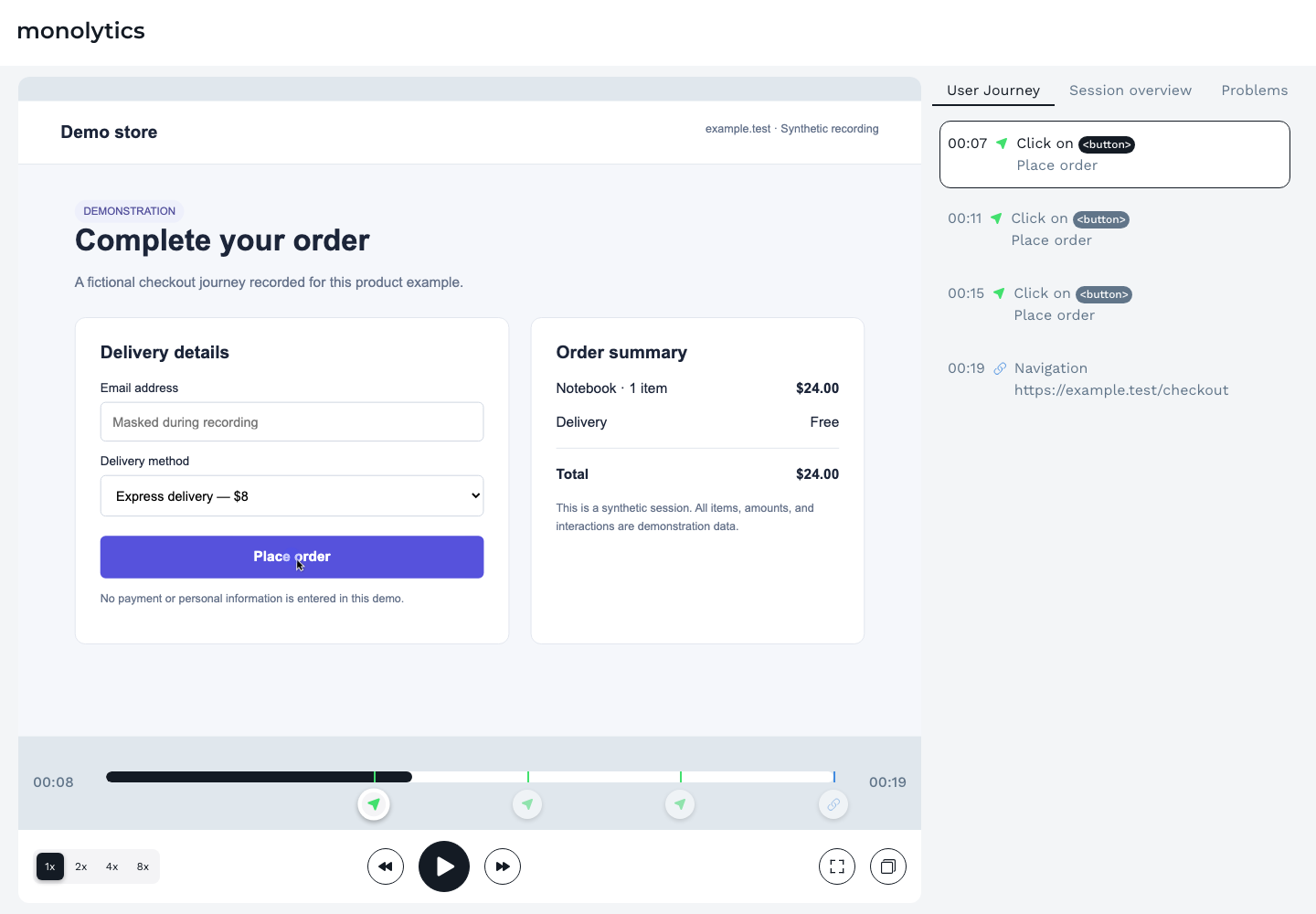
The User Journey lists Place order clicks at 00:07, 00:11, and 00:15, followed by a navigation entry at 00:19. That supports a note about repeated clicks. This still image does not establish whether an order completed, whether the button failed, or why the clicks repeated.
A useful note would read:
Observation: the shown User Journey contains three Place order clicks. Outcome: order completion is not confirmed by this image. Next check: inspect what happens after each click in the recording and check the completion source. Compare a similar successful checkout before describing a broader pattern.
Expected behavior also needs checking. A control might respond slowly, display feedback elsewhere, or allow valid repeated interaction. If the evidence points to a non-responsive control, use the dead click investigation guide.
Keep a small comparison log alongside the note. Add one row for each recording you actually reviewed; preserve access-controlled references within your team.
| Recording and moment | Comparable context | Before → action → after | Confirmed outcome and source |
|---|---|---|---|
Do not infer an outcome from an empty cell. Write “unknown” and the check needed to answer it.
Signal taxonomy
Use simple labels to find notes later: repeated clicks, validation retry, return to a previous step, help visit, or exit. Describe the visible action before assigning an interpretation. A help visit does not prove confusion, and a pause does not prove frustration.
Common mistakes
Starting without a decision question
Name the decision before watching. Otherwise, an interesting detour can pull the review away from the problem.
Watching only failed sessions
Compare equivalent successful journeys. If they show the same pause or help visit, that behavior may be normal. Check differences in device, source, account state, or product version before treating the comparison as meaningful.
Treating frustration signals as proof
A repeated click is a cue to inspect context, not a direct measure of emotion. A selected collection of recordings also cannot supply an all-user frequency without the appropriate population and count.
Ignoring privacy and consent boundaries
Share recordings only with people authorized to review them. Keep identifying or sensitive content out of copied notes and public examples; check the privacy controls and collection requirements that apply to your installation.
Shipping from one vivid clip
One verified defect can deserve a repair. One memorable clip does not establish a redesign priority or a conversion forecast. Controlled experiments address a different question: whether a change causes an outcome to improve.
Where this fits in the Monolytics workflow
Use Monolytics Session Replay to inspect a recording and its surrounding activity. If an AI summary started the investigation, first check the summary against its evidence. Then write this note using what you verified.
If completion is missing, use the event-tracking guide to review the signal you need. A recorded click should stay a click until a separate completion source supports more.
Next step
Pick one finding from your current review and fill the seven fields. Ask a teammate to locate the moment and explain what is known, what remains open, and which check comes next. If they cannot, clarify the note before using it in a larger decision.
Sources used
- Sentry: Session Replay configuration and sampling, checked October 14, 2026.
- Kohavi, Henne and Sommerfield: Practical Guide to Controlled Experiments on the Web, KDD 2007.