How to collect targeted website feedback with Monolytics Surveys

On this page
A targeted website survey asks about a particular experience, rather than asking every visitor the same broad question. Begin with the decision you need to make, then choose an audience, a supported moment, and a question that audience can answer.
For example, a team revising a listing form might ask: “Which part of creating this listing, if any, took more effort than expected?” The answer can suggest a problem to investigate. It does not prove that the form caused every abandoned listing.
This guide takes you from that decision to a survey you can check and a response you can review. For the product overview, see Monolytics Website Surveys.
Define the decision before opening the editor
Write down what the feedback should help you decide. “Which setup instruction should we clarify?” or “What information is missing from the search results?” gives the team a concrete next action.
Choose whose recent experience matters. A new user setting up an account and an experienced user completing a repeated task may need different questions. Do not assume their answers describe the same problem.
Use this short planning record:
| Planning question | Example |
|---|---|
| What decision will we make? | Decide whether to revise the listing-form instructions |
| Who has the relevant experience? | People who just tried to create a listing |
| Which moment can the site identify? | An instrumented listing-submission event, or a configured listing page |
| What will we ask? | Which part of creating this listing, if any, took more effort than expected? |
| What else will we review? | The response and any available session context |
This is a planning example. It does not claim a ready-made listing integration or an observed customer result.
Choose a supported survey moment
Monolytics supports page or path conditions, page load, time on page, instrumented custom events, and available client or session properties. Choose conditions your installation can identify reliably.
For a page-based survey, check that the intended page is the one where the visitor has the experience you ask about. A question on an information page can ask what is missing without assuming the visitor completed a purchase.
For an event-based survey, configure the event first and confirm that it represents the intended interaction. A click is not necessarily a completed task. Follow the event-tracking setup guide for the existing instrumentation path.
Time on page can define when a question appears. It does not, by itself, establish confusion, dissatisfaction, or intent to leave. If your site changes routes without reloading, check the route sequence you intend to target as well as a direct page visit.
If the required moment is not available, choose a supported page-based question or postpone that particular survey. Keep the question honest about what the visitor has actually experienced.
Write a short, neutral question
Ask about one task at a time. Compare “Was the setup fast and easy?” with “Which part of setup, if any, took more effort than expected?” The second question leaves room for a smooth experience and asks about one specific aspect.
Avoid requesting contact details or other personal information unless it is needed for the research and you have addressed the relevant privacy responsibilities.
These examples connect a question to a decision:
- Setup instructions: “What, if anything, was unclear about this step?”
- Search information: “What were you trying to find today?”
- Feature usefulness: “What were you trying to accomplish with this feature?”
- Evaluation content: “What information, if any, is missing for your decision?”
- Immediate purchase experience: “What, if anything, was difficult about placing this order?”
The purchase example belongs only on a supported surface after the relevant experience. It says nothing about delivery, later satisfaction, or a particular commerce platform.
Use the UX survey question guide when you need examples for a different decision. SurveyMonkey’s question-writing guidance explains common leading and double-barreled wording mistakes.
Create the survey and check the setup
Connect the website to Monolytics and confirm that the intended site is collecting sessions. For WordPress, use the existing plugin setup guide; the plugin connects your site, while you author the survey in Monolytics Cloud.
Open Surveys in your workspace, create the questionnaire, and configure the supported page, timing, event, or property conditions for your chosen moment. Review the collection settings in the current product and current plan terms before starting.
The example below combines a checkout page condition with timing and audience settings.

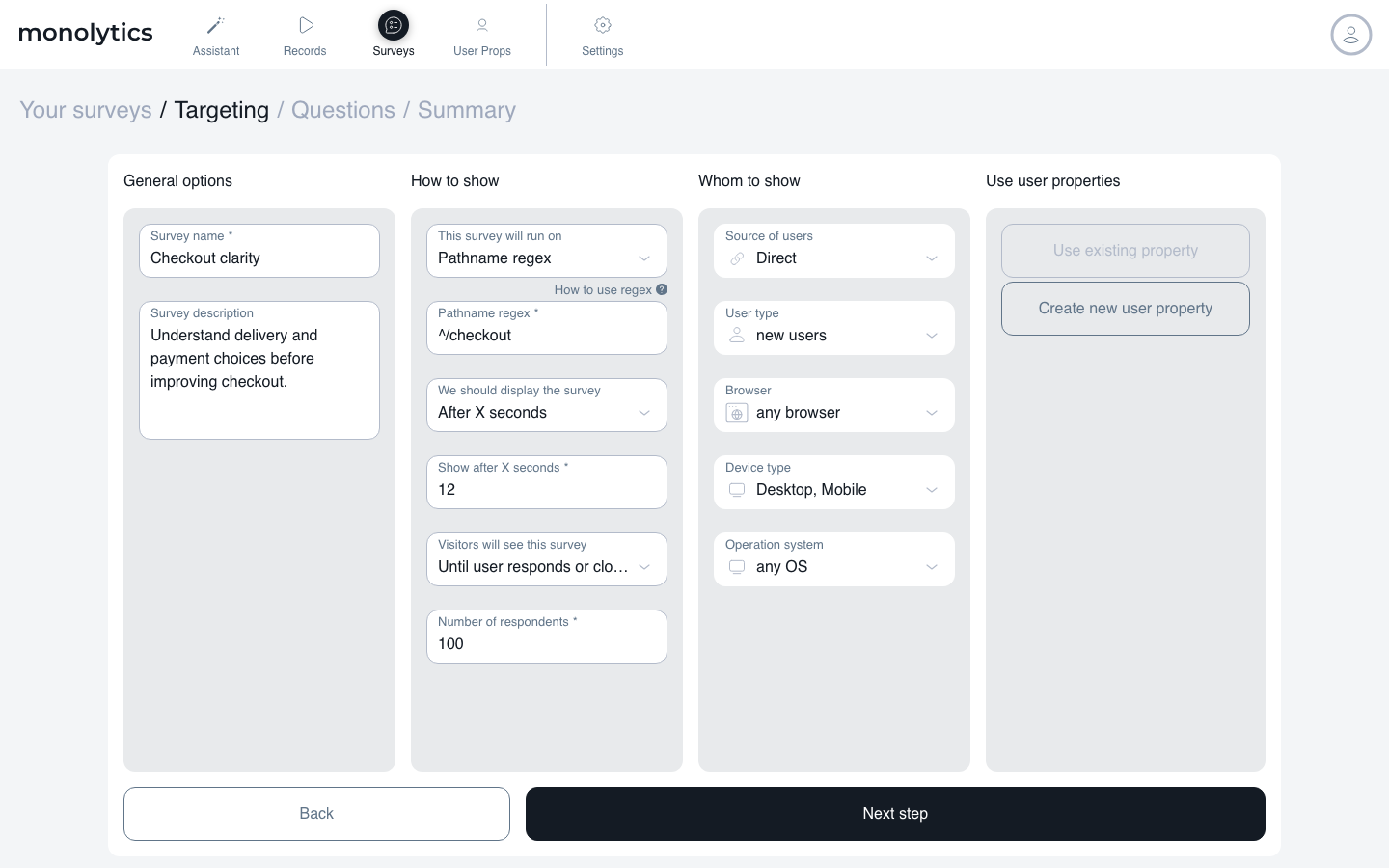
Walk through the intended flow on a test visit. Check that the question appears on the right page, that its wording matches the experience, and that it does not interrupt an unfinished task you need the visitor to complete. If you use an event, check the event-driven path. If navigation changes without a reload, include that path in your check.
Submit a clearly identified test answer and check the response in the product. A successful preview or a clicked Start button does not establish that an answer was collected. Keep test answers separate from the customer feedback you will interpret.
Review a response and its available context
Review the answers per question in the survey’s response analytics. When an associated session record exists, open the replay to examine observable activity around the experience. Not every answer has a stored replay.
Use the response view to read an answer alongside the session context that is available.

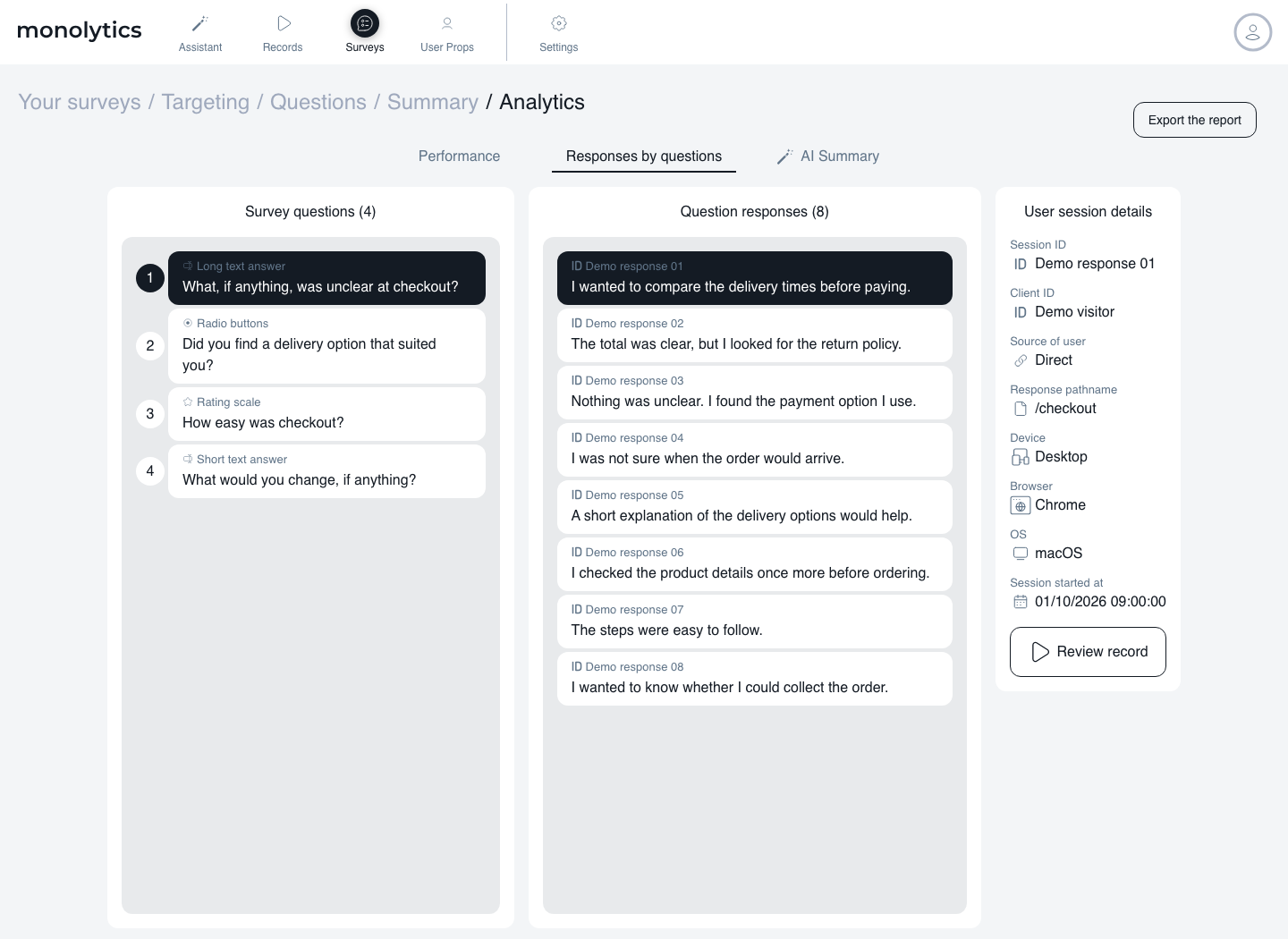
Record two separate observations: what the respondent said, and what the available behavior shows. If a respondent reports an unclear instruction and the replay shows several edits, that is a reason to investigate the instruction. It does not prove the instruction caused the edits.
Group responses around the decision you started with. Distinguish different tasks or audiences where that context is available. Report what is missing rather than guessing it: an answer without replay, an unknown segment, or feedback from only people who completed the task.
Choose a small next step, such as rewriting one instruction or testing a clearer explanation. The feedback-to-experiment guide helps turn a reported problem into a hypothesis you can examine.
Keep the survey useful over time
Decide when you have enough information to revisit the decision and when the question should stop. A prompt that was useful during a release can become irrelevant afterward. Check repeat behavior in your setup and avoid asking someone for the same feedback without a reason.
For broader guidance, read survey fatigue and repeated NPS prompts and in-product survey best practices. These are research and operating guides; apply only the survey conditions your site supports.
Targeted-feedback FAQ
Is a targeted survey always better than a broad survey?
Use a targeted question when you need to understand a particular experience. A broad survey can suit an overall sentiment question. The right choice follows the decision, rather than a rule that one method always wins.
Can I ask users why they abandoned a task?
Only ask people you can reach at a supported moment. People who already left may not see an on-site prompt. Do not treat answers from remaining visitors as the views of everyone who abandoned the task.
Do I need a replay to use an answer?
No. A response still records what someone reported. Available replay adds observable context, but missing replay must remain explicit and does not invalidate or verify the account by itself.
Can these steps run entirely inside WordPress?
The WordPress integration connects the site to the hosted Monolytics workspace. It does not make this guide a native WordPress survey-authoring workflow.
Continue with the task you need to solve
Choose one question, check its supported moment, and review a collected answer before expanding the survey.
Explore Website Surveys · Open Surveys in your workspace
Related survey workflows
- Event-triggered surveys for planning when to ask.
- Feature adoption with micro-surveys for questions after feature use.
- Session replay analysis workflow for reviewing observable friction.
- Behavior analytics for product marketing teams for message and evaluation questions.
- User feedback workflows for early-stage startups for a recurring research loop.
- Targeted user feedback in Monolytics for the existing product-side workflow.