When Not to Trust AI Session Summaries
On this page
Before using an AI session summary to choose a fix, check its important claims against the recordings and the question you asked. A clear answer may still count the wrong action, mix unrelated sessions, or explain behavior the evidence cannot explain.
This guide works through a Monolytics example: 38 of 120 analyzed pricing-page recordings include a Start free click. That is a useful observation. It does not tell us how many people completed signup.
Start with what the answer actually counts
Write down the question, period, and unit before reviewing the summary. Are you counting recordings, people, accounts, clicks, or completed outcomes? Does the answer use the same unit?
Then check how the recordings were selected. A set chosen because it contains errors answers a different question from a broader set of pricing visits. Keep any share tied to the population actually analyzed.
One recording can establish an observable failure worth investigating. It cannot establish how common the failure is across the product. For a general pattern, record what was reviewed and what remains outside the review.
Keep the groups comparable
Compare the same journey and period, then check device, browser, source, account state, or permissions where relevant. A setup problem affecting one account role needs that boundary in the note; “users cannot finish setup” loses it.
Look at successful sessions too
If successful visitors also pause at the same step, the pause alone does not distinguish failure from success. Inspect what happens next. A visible error, a recovery step, or different permissions may provide a better lead. The UX-issue validation guide helps structure that comparison.
Check a Monolytics answer
The example below answers a narrow question: what share of analyzed pricing-page recordings included a Start free click from July 1 through July 7, 2026?

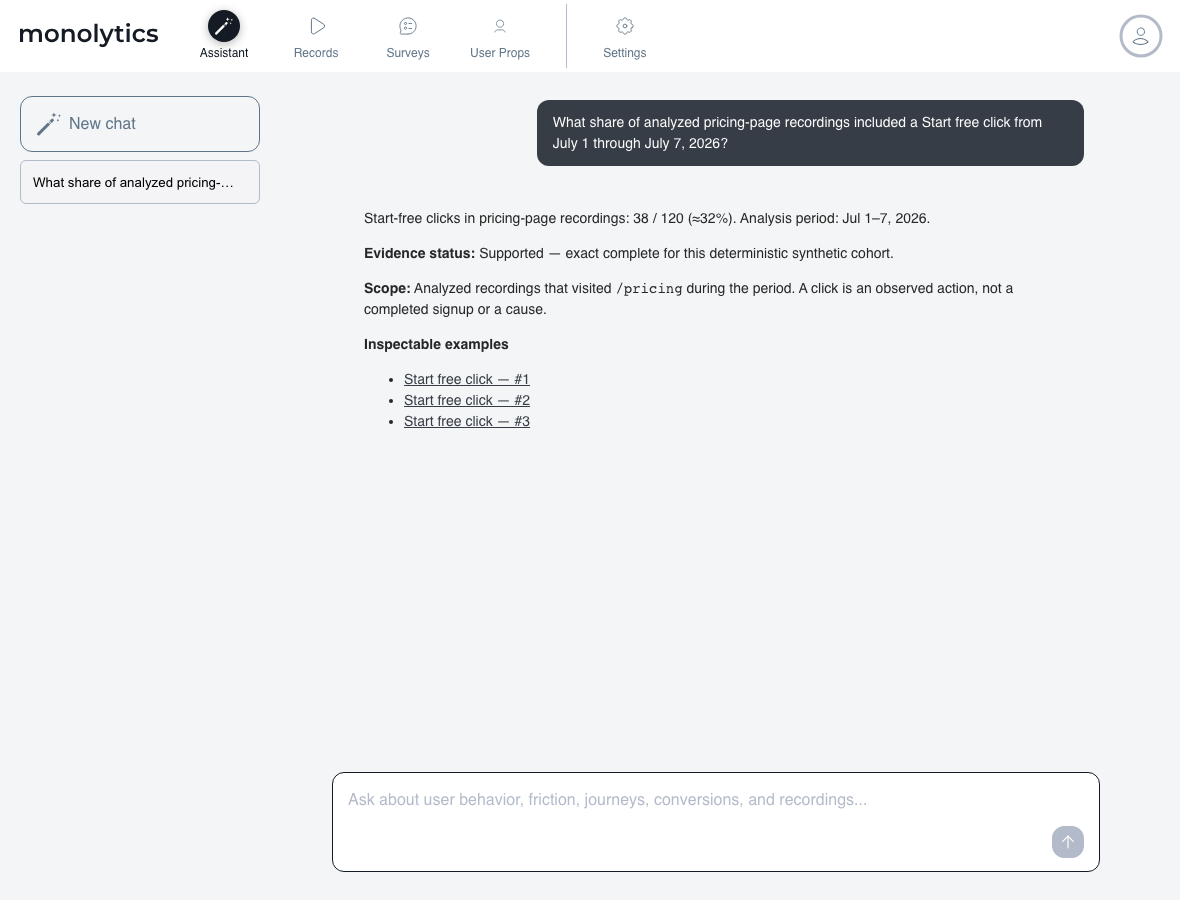
Check each important statement separately:
| Statement to check | What the example supports |
|---|---|
| “About 32% included a Start free click.” | 38 ÷ 120 ≈32%, within the analyzed pricing recordings and stated period. |
| “About 32% completed signup.” | Unknown. The observed action is a click; completed signup is not established. |
| “The pricing page caused people to leave.” | Not established. Neither the count nor the example supplies a cause. |
FActScore research takes the useful approach of checking individual factual statements because generated text can mix supported and unsupported information. Its study concerns generated text, not the accuracy of replay tools. Here, the same review habit keeps one supported count from making the whole interpretation sound proven.
A click is a step, not a completed outcome
For a signup question, look for the completion event or confirmed success state. A button click can precede a validation failure, interruption, or later completion. When the completion signal is unavailable, keep the result unknown. Writing “zero signups” would turn missing information into a result you have not measured.
Describe the action before explaining it
“The visitor returned to plan limits, opened the FAQ, and left” is an observation you can inspect. “The visitor thought the price was too high” needs more evidence, such as a relevant feedback response.
NIST’s generative AI risk profile describes how incorrect answers can be presented confidently, including misleading explanations. A plausible explanation is therefore another claim to check, not a reason to skip the recording.
Write a note someone else can check
Keep three parts separate:
- Observed: 38 of the 120 analyzed pricing-page recordings included a Start free click during July 1–7, 2026.
- Unresolved: the completed-signup share and the reason any visitor left.
- Next check: confirm how successful signup is recorded, then ask the outcome question using that signal and the same defined scope.
For a behavior claim, add the supporting recording and timestamp, the relevant environment, and what happened before and after the moment. Record an interpretation separately from what you watched. Use the evidence review template to keep those references together.
A study of 22 analysts found verification involved checking both analysis procedures and the resulting data. The study used data-analysis tasks, not replay accuracy tests. For replay review, ask how the answer’s scope was defined and inspect its supporting material.
Keep missing context unknown
When masking, a capture gap, or an unavailable recording hides the decisive step, state that limit. Preserve the privacy boundary and seek a safe event, test account, or feedback check. The privacy-safe replay guide covers review and sharing considerations.
Choose the next action to fit the finding
A reproducible broken control can justify a narrow bug investigation. An ambiguous pause may need feedback. A missing outcome needs instrumentation. Claims about lost revenue or the benefit of a redesign require more than a recording or summary. Keep the action proportional to what you can verify.
Review the evidence in Monolytics
Use Monolytics Assistant to ask a bounded product question, check the answer’s scope, and inspect its supporting examples. Use the natural-language Record Search guide when you need to find recordings for manual review.
Start with product questions if the request is too broad. Use the AI replay checklist and evidence confidence matrix when you need to decide what additional review a finding deserves. For an ongoing workflow, check Monolytics pricing against your planned use.
Continue with the next check
- Summaries versus evidence review for choosing the depth of review.
- Assistant question examples for a more precise request.
- Journey analysis when the question spans several steps.
- Bug triage when a visible symptom needs investigation.
Sources and scope
The linked NIST profile, FActScore paper, and analyst study support the review approach. The screenshots illustrate a product workflow; they do not measure customer results, model accuracy, or conversion lift.