Your questions
Ask in your own words
“Where do visitors get stuck on mobile?” “Which paths do they take?” “Do we have enough data to measure signup completion?” You do not need to choose a report first.

Monolytics Assistant
Ask about visitor journeys, errors, or where people get stuck. Monolytics Assistant uses your site’s collected activity and business context to answer.
Check the time period and sources. Open the recordings, correct your business context, or ask what data is missing. Your team decides what to change.

An analyst inside your product
Start with a question. Assistant uses your site’s collected activity and business context, explains its assumptions, and asks for clarification when needed.
Your questions
“Where do visitors get stuck on mobile?” “Which paths do they take?” “Do we have enough data to measure signup completion?” You do not need to choose a report first.
Your business
Assistant builds context from your pages, events, and observed behavior. Confirm or correct your product goals, page names, and recurring user jobs. Inferred meaning stays a hypothesis until supported or confirmed.
Your answers
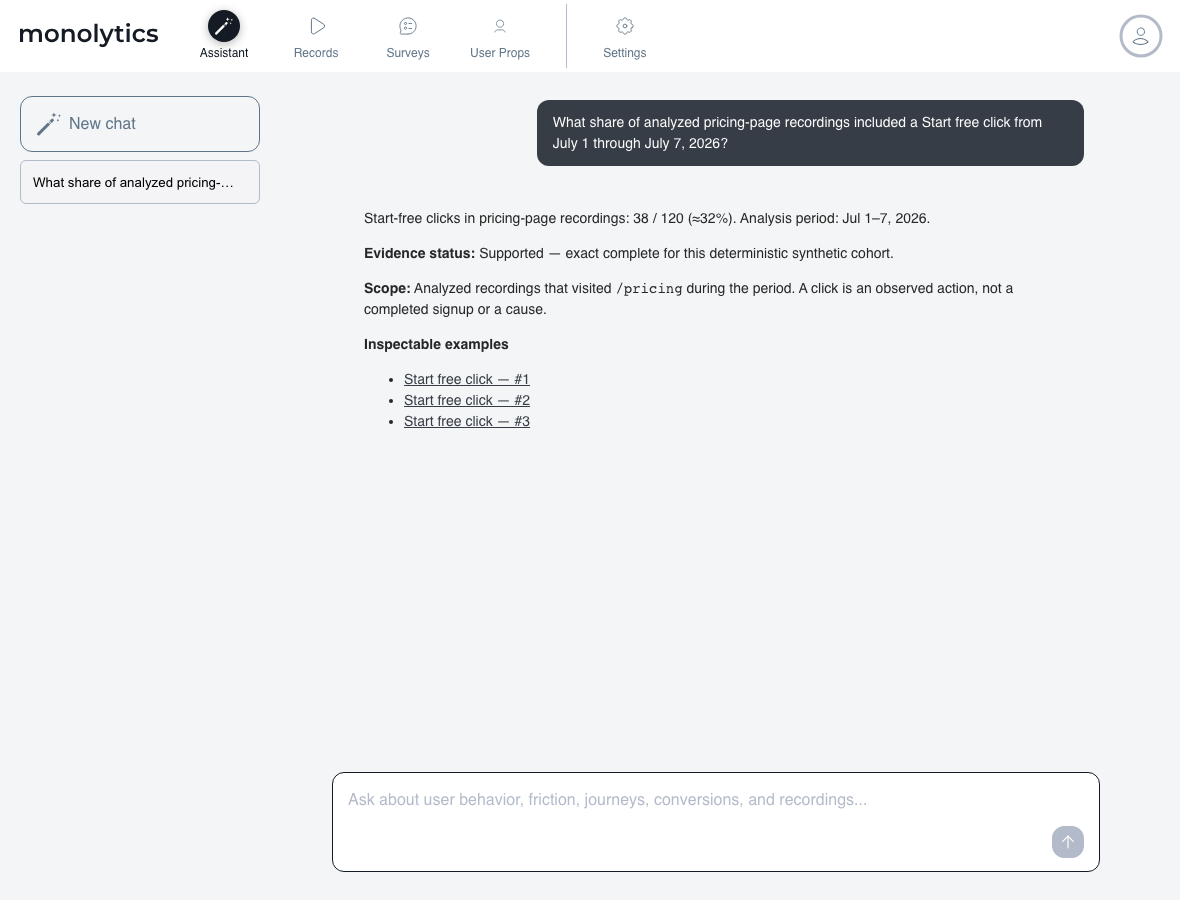
Review counts, comparisons, and summaries with their units, period, scope, and supporting sources. A click and a completed signup remain different outcomes.
Your visitors
Inspect relevant recordings at the moment that supports an error or friction signal. A technical signal and its demonstrated effect on a visitor remain distinct.
Your data
Ask what is missing from an investigation. Assistant can explain the event, Survey, or Record Campaign needed to answer an observable question, and help you understand how to use Monolytics.
Your decision
Use the answer to choose a follow-up investigation or product change. Your team reviews the evidence and takes the action.
From question to investigation
Monolytics is an AI-assisted session replay and product analytics platform. Its Assistant answers product questions with inspectable evidence and exposes missing data instead of guessing.
Describe what you want to understand about your site. Assistant states the scope and any assumptions it uses.
Review what Assistant understands about your business. Confirm or correct that context and check the answer’s sources and limitations.
Inspect representative replays and supporting signals. A replay shows observed activity; it does not establish motive or causality.
Use the evidence to guide a change, a follow-up question, or better instrumentation. Your team makes the decision.
Read the answer, then its boundaries
If data is missing, Assistant shows what it can verify and what remains unanswered. It explains why and, when supported, suggests an event, property, Survey, or recording step to check next. Missing data is never counted as zero.
A browser client is not a verified person. Recordings, events, and identified users are different units.
Known: a signup-entry click was recorded in this example.
Cannot conclude: completed signup cannot be calculated from that click.
Missing signal: add and verify a signup-completion event before asking for the completion rate.
Example: an answer that separates an observed click from missing signup data.
Practical guides
See example questions and learn how to check an answer.
Questions
Choose evidence-ready questions about pricing, signup, and onboarding behavior.
Find your starting question →Meet your Assistant
Understand questions, business context, inspectable answers, and the next step when data is missing.
Meet Monolytics Assistant →Confidence
Separate an investigation lead from a repeated pattern or a supported finding.
Review the confidence matrix →An exact answer needs an observed signal. Use the event-tracking setup guide to add and verify missing instrumentation.
A place in your team's workflow
Give your analyst a faster path from a product question to scoped evidence and inspectable replays.
Ask the same product question directly; Monolytics narrows the evidence and states what it can and cannot conclude.
Natural-language Record Search finds or filters sessions for manual review. Assistant answers a defined question with scope, period, values, and sources.
Review the Privacy Policy and GDPR information when configuring your installation.
Monolytics Assistant is your site’s analyst: ask in everyday language about visitor journeys, errors, friction, business flows, and the state of your data. It uses collected activity and business context, keeps its sources and limitations visible, and helps you understand how to use Monolytics.
Ask where visitors get stuck, which paths they take, how supported segments compare, what errors appear, or whether your data can answer a question about signup or another business flow. You can also ask about collected content exposure, your business context, and using events, Surveys, or Record Campaigns. Assistant states the scope and assumptions behind the answer; a recording or exposure signal alone does not prove someone’s motive or that they read the content.
Assistant builds context from your site’s pages, events, and observed behavior. You can confirm or correct what it understands about your product, page names, goals, and recurring user jobs. Your confirmed context and an interpretation of behavior carry different levels of certainty.
Assistant can infer recurring user jobs from observed behavior and your business context, and treats those interpretations as hypotheses until supported or confirmed. A recording alone does not prove a person’s motive or the cause of a problem. Technical signals, observed impact, and suggested next checks stay distinct.
Review several representative sessions, compare failed and successful paths, confirm the visible symptom, and check supporting events or errors when they matter. Then choose whether to fix, instrument, ask a targeted question, or continue monitoring.
Configure masking and redaction controls for applicable input fields and verify the rendered capture before using Monolytics in production.
Review Using Monolytics under GDPR, the Cookie Policy, and the Privacy Policy. The temporary GDPR and cookie wording is risk reduction pending qualified legal review, not legal approval or legal advice.
Assistant is available on the Free, Growth, and Pro plans. Account Owners and Editors can ask questions; Viewers can review conversations but cannot submit questions.
Free includes 60 Assistant questions per UTC calendar month and 10 per UTC day. Growth and Pro each include 500 per month and 50 per day, shared by the account for each domain.
Assistant question allowances are shared by the account for each domain and reset at UTC calendar month and day boundaries. A question counts when the Assistant delivers a measured or documented answer. Failed or undelivered requests return their reserved question. Service safeguards also apply.
Compare prices and the separate tracked visitor session allowances on the pricing page.
Start free, ask your question, and check the answer’s sources and limits.